Gowaal Logo
Gowaal
For water can suppliers

Know where every can is

Count full cans given and empties taken back at every stop. The app keeps how many cans each customer has, so no can goes missing.

Works without internet · ગુજરાતી, हिन्दी, English

Tap the phone to watch again

1

Full given, empty back, both counted

At each stop, tap plus or minus for full cans given and empty cans taken. Deliver all marks the whole route at the usual counts.

FitLife Gym✕
Full cans given−4+
Empty cans taken−4+
Cans with customer4 cans
CancelGive 4 cans
2

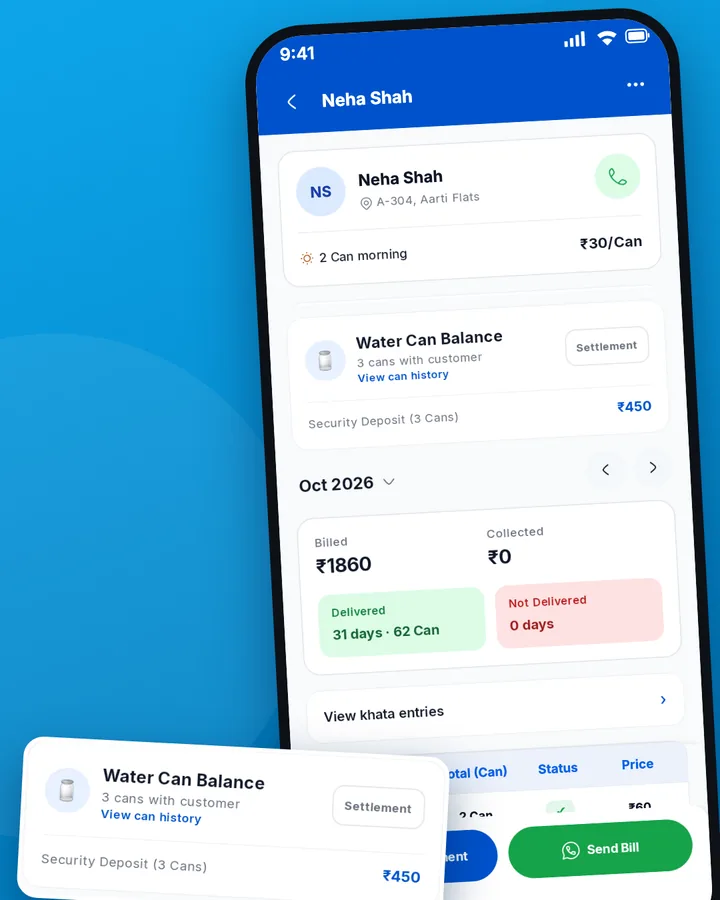
Cans with each customer, deposit kept apart

See how many cans each customer holds and the full can history. The security deposit stays separate from the delivery bill.

Customer's water can balance
3

The customer knows right away

Every delivery reaches the customer's phone. Wrong count? Fix today's or yesterday's entry, and the customer is told.

Optional. This notification goes only to customers connected through the app.

Gowaaltoday 9:12 AM
✓ Delivered · 4 cans
Om Water Supply
Gowaaltoday 9:05 AM
✓ Delivered · 3 cans
Om Water Supply
4

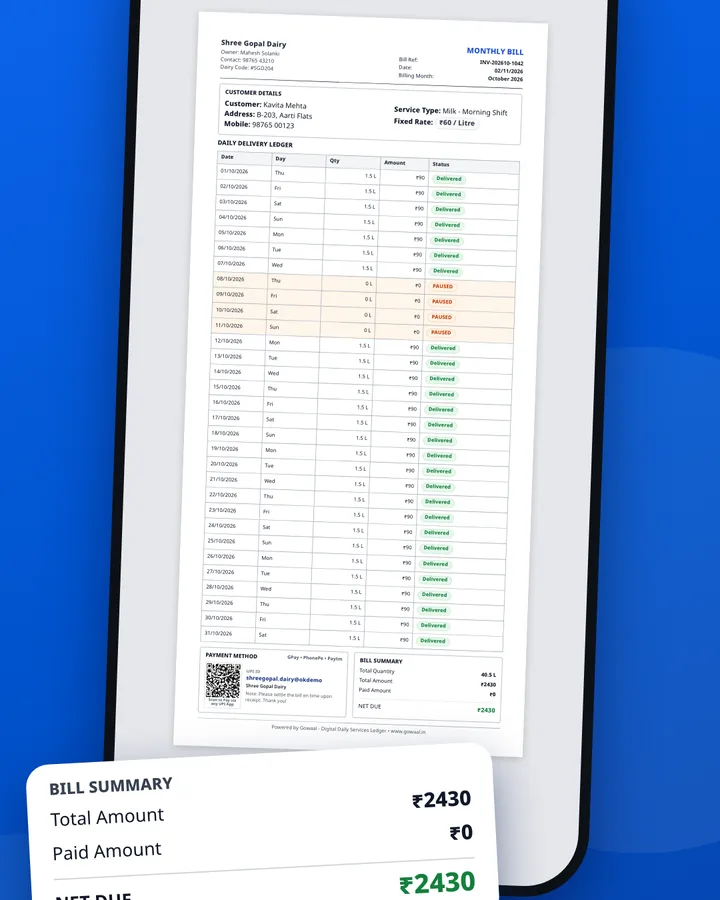
Monthly bill on WhatsApp

A PDF bill with your UPI QR. Record cash and UPI payments and see who still owes.

PDF bill to send on WhatsApp
5

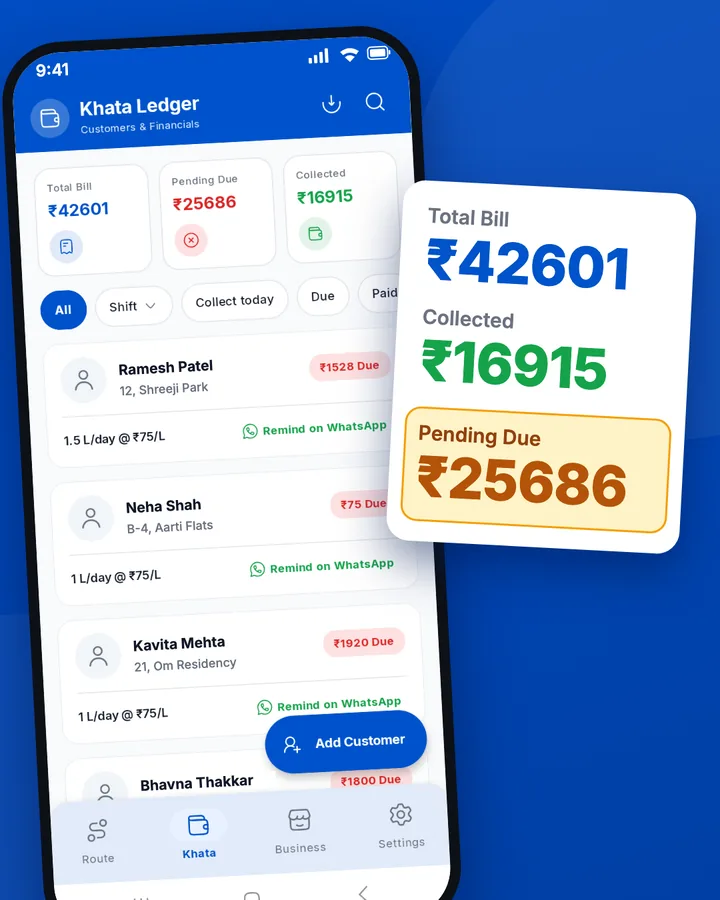
Who owes how much, at a glance

Billed, due and collected at the top. Filter by shift, due or collected, remind a customer on WhatsApp with one tap, and download all bills as one PDF.

Khata: total bill, pending due and collected
6

Can lost or broken?

Add a charge for it in the can history. It shows on the bill, and you can waive it with one tap.

Can history
FitLife Gym
4 NovFull 4 · Empty back 3
5 Nov · Lost canCharge added
Shown on the billWaive
7

Open any day

The date at the top is always Today. Tap it to open any other day and see its deliveries. Today's and yesterday's entries can be fixed.

Pick a dayYesterday
Today · 6 Nov12 cans delivered
Yesterday · 5 Nov12 cans delivered
4 Nov11 cans delivered
8

Add a Delivery Saathi. You stay in control

Add your helper's name, phone and shift and send the code on WhatsApp. A Saathi sees only what you allow: delivery, cash or more. You see what they did, with the time, and “See as Saathi” shows you their screen. Customers, rates and bills stay with you.

MP
Mahesh Parmar
Delivery Saathi
What can your Saathi do?
Delivery onlyDelivery + cashAlmost like me
Saathi activity
✓Delivered · Ramesh Patel · 4 cans6:12 AM
●Took cash · Neha Shah6:40 AM
!Quantity far from usual · Kavita Mehta7:05 AM
See as Saathi
9

Your whole business in one tab

Each product with its own rate, your Delivery Saathis, and shifts with Take a day off. When you change a rate, choose all customers on that product or only new ones, from the date you pick.

Products and rates
20 L can
Own rate
+ Add product
Delivery Saathi
MPRS
Shifts
MorningEveningTake a day off
10

No network? No problem

Entries save on the phone first and upload when the network returns. Your round never waits.

Offline
Tech Developer✓ 2 cans delivered
FitLife Gym✓ 4 cans delivered
Dr. Mehta Clinic✓ 1 cans delivered
✓
Saved on phone
Uploads when the network returns

Questions

How are empty cans tracked?

At each stop you log full cans given and empty cans taken back. The app shows how many cans each customer has and keeps the full can history.

Is the security deposit mixed with the bill?

No. The security deposit is kept separate from the delivery bill.

Does Gowaal work without internet?

Yes. Entries save on the phone first and upload when the network returns.

Do my customers have to install the app?

No, it is optional. A customer sees their own calendar and bill only after they scan your QR and you approve. Customers you add by hand stay on your route and khata without the app.

Can I add a delivery helper?

Yes, a Delivery Saathi. Add their name, phone and shift and share the code. You approve them and choose what they can do. You see what they did, and customers, rates and bills stay with you.

How do I add my customers?

Share your QR or business code so customers join themselves, add them by hand, or take a photo of your notebook page and check the list before saving.

Deliver milk too? See the milk page