
Water Can Delivery: How to Track Full Cans, Empties and Deposit
Water can delivery tracking made simple: three numbers to note on every visit, a worked example, a free printable can register and a clean deposit.
Published 5 October 2026 · 8 min read
It is Tuesday, 11 AM. You carry two full cans up to the office on the second floor. The manager looks at your notebook and says, "We only have two of your cans here." Your notebook says five. Three cans, and the deposit on them, are now just your word against theirs.
Every water vendor has had this day. The water was never the problem. The water can delivery tracking was. This guide shows a simple way to keep every can counted: what to note on each visit, a worked example, how to handle the deposit, and a free can register you can print today.
In short: on every visit, note full cans given, empty cans taken back, and cans now with the customer. Keep the deposit in its own line, never inside the monthly bill. When the "with customer" number goes up, ask about it that same week, not at month end.
Why water can delivery tracking goes wrong
Milk is simple: it is delivered and it is gone. A water can comes back. Or it is supposed to. That one difference creates most of the trouble:
- Empties are not counted. You are in a hurry, you pick up whatever empties are near the door, and you note only the full cans.
- Cans move around. In offices and apartments, a can goes to another floor, a pantry or a neighbour, and nobody remembers.
- New people, old cans. The office boy changes, and the new one has no idea how many cans belong to you.
- The deposit gets mixed in. When the deposit sits inside the bill, nobody can tell later what was paid for water and what was paid for cans.
- Problems show up too late. A missing can noticed after three months is very hard to argue about.
None of this is about honest or dishonest customers. It is about missing numbers.
The three numbers to note on every visit
Keep it this simple. At every stop, note:
- Full cans given today.
- Empty cans taken back today.
- Cans with the customer after this visit.
The third number does the real work. It is the last balance, plus full cans given, minus empties taken back. If a customer usually keeps 4 cans and suddenly has 6, you know something is off, and you know it this week.
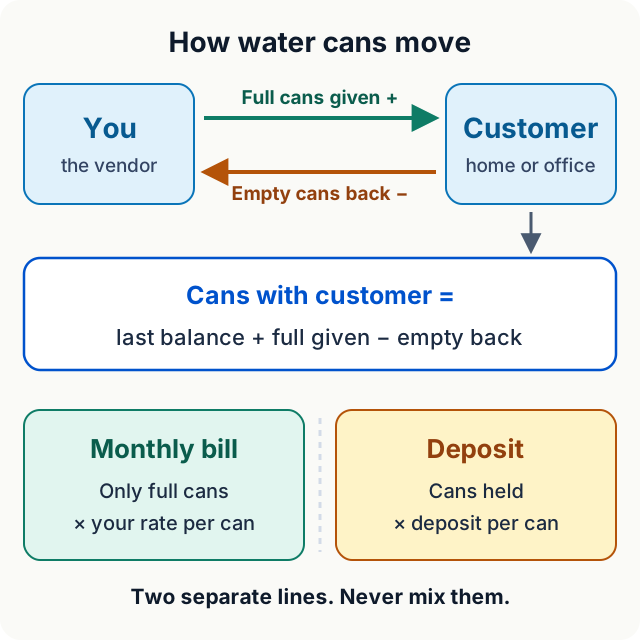
Water and cans are two different accounts. The bill follows the water. The deposit follows the cans.
A worked example: one week at one office
Here is one week at a small clinic. At the start of the week, they have 4 of your cans.
| Day | Full given / empty back | Cans with customer |
|---|---|---|
| Start of week | 4 | |
| Monday | 2 given, 2 back | 4 |
| Wednesday | 3 given, 2 back | 5 |
| Friday | 2 given, 1 back | 6 |
| Saturday | 1 given, 3 back | 4 |
Look at Friday. The count went up to 6, because two empties did not come back that week. Because you noted it, you could ask on Saturday: "Two empties are pending, can you check the store room?" They found them, and the count went back to 4.
Without the third number, you would only have found out at month end, if at all.
For the bill, only the full cans count: 8 full cans this week, times your rate per can. Empties never go into the water bill. If you also deliver milk and want to check bills by hand, see how to calculate the monthly bill without mistakes.
Keep the deposit out of the bill
Most vendors take a deposit for each can. The amount is your own rule. Here is an example only: if you take ₹150 per can and a customer keeps 4 cans, you hold ₹600 of their money.
Keep that ₹600 in its own line:
- The bill is for water delivered this month. It changes every month.
- The deposit is for your cans. It does not change unless the number of cans changes.
- When the customer stops, they return the cans, and you return the deposit for the cans that came back.
Write the deposit and the number of cans it covers on day one, and show it to the customer. A clear start avoids most fights at the end.
Five common can arguments, and how to stop them
- "We returned it last week." Note empties on every visit, even when it is just one. Then the record shows which week it came back, or that it did not.
- "It must be on another floor." For offices and buildings, agree on one place where empties are kept. Ask for them at the same spot every time.
- "The new office boy doesn't know." Tell the person who pays, not only the person who opens the door. Share the can count with them once a month along with the bill.
- "The can broke." Agree on the lost or broken can rule when you start, not when it happens. Then note it on that date.
- "We are stopping, give our deposit back." Count the cans with them, take them back, and return the deposit for the cans that came back. If your record matches theirs, this takes two minutes.
A free can register you can print
Not ready for an app yet? Start with paper, but the right paper. This one-page register has the three numbers and a deposit line already printed on it.
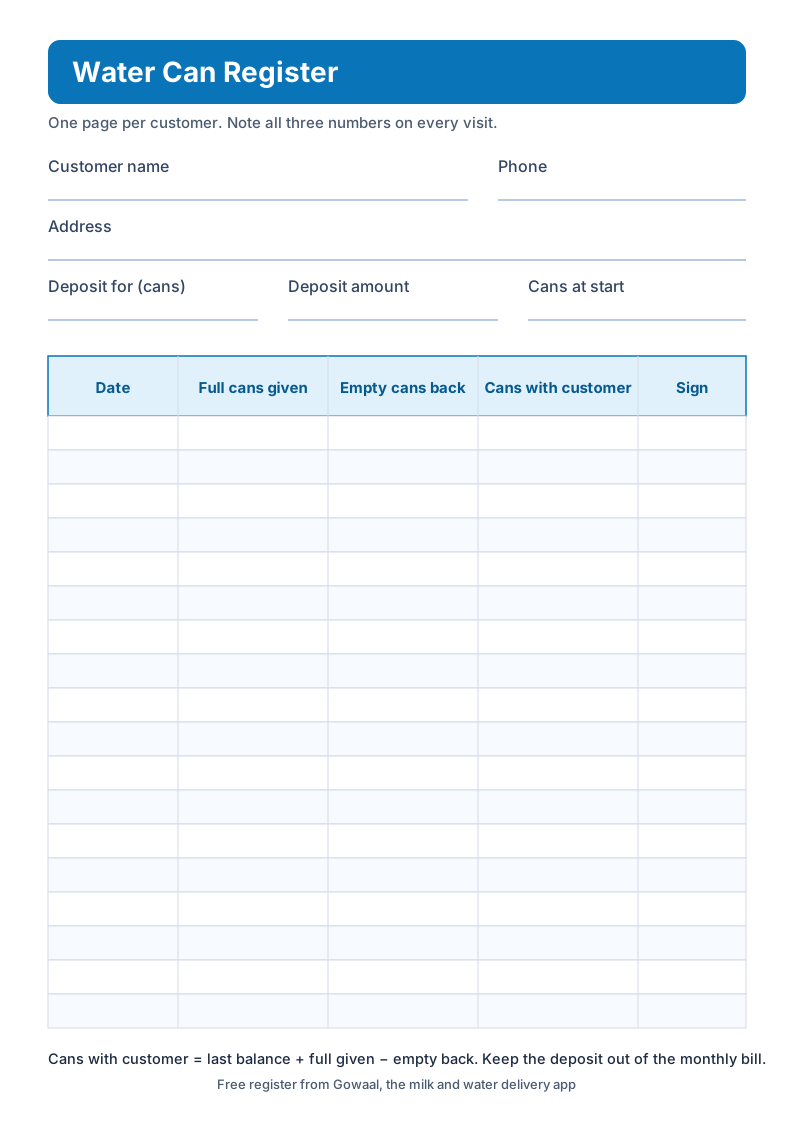
Tap the register to open it, then print one page for each customer. Keep it in a folder on the scooter.
Paper still has the old problems: it gets wet, it gets lost, and the customer cannot see it. But even paper works much better once the three numbers are on every line.
How Gowaal helps with water cans
Gowaal is a daily delivery khata app for milk and water vendors. For water cans, this is what it does:
- Note full and empty cans. At each stop, note the full cans you delivered and the empty cans you took back.
- See cans with each customer. The count updates on its own, so you never do the "last balance plus, minus" in your head.
- Open the can history. See past entries when someone says "we returned it last week".
- Keep the deposit separate. The security deposit sits in its own line, never inside the delivery bill.
- Send the bill on WhatsApp. The monthly bill goes as a PDF with a UPI QR, and you note cash and UPI payments in the khata. See how to send the monthly bill on WhatsApp.
- Work without network. Basements and lift lobbies are no problem. Entries save on the phone and sync later.
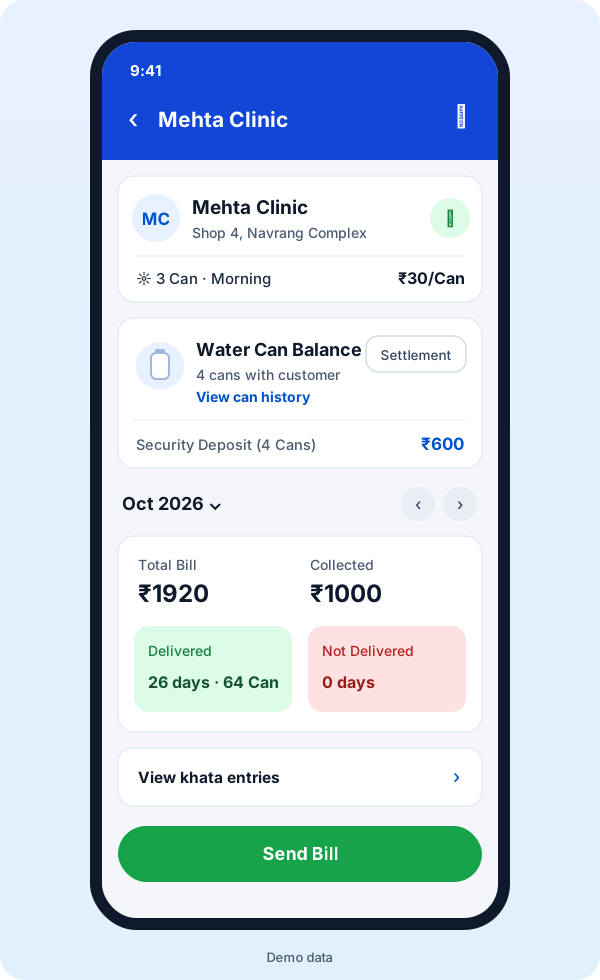
A water customer in Gowaal, with demo data: cans with the customer, the deposit, and this month's cans in one place.
The app works in Gujarati, Hindi and English, and it is free to use right now for vendors and customers. Choosing between apps? Point 8 of our checklist for the best milk diary app is about exactly this. For the full picture, read the simple guide to the milk and water delivery app.
Final thoughts
Water vendors do not lose money on water. They lose it on cans that slowly go missing and deposits that nobody remembers. Three small numbers on every visit fix most of it: full given, empty back, and cans with the customer.
Start today with the free register, or let the app do the counting for you. If you would like to try it, download Gowaal from the Play Store and add your first five water customers this evening.
Frequently asked questions
How do I keep track of empty water cans?
On every visit, note three numbers: full cans given, empty cans taken back, and cans now with the customer. The last number is simply the old balance plus full cans given, minus empties taken back. If that number keeps going up, ask about the missing empties that same week.
Should the water can deposit be added to the monthly bill?
No. The bill is for the water you delivered. The deposit is the customer's money you hold for your cans, and it goes back when they stop and return the cans. Keep it in a separate line so it never mixes with the bill.
What should I do if a customer loses or breaks a can?
Agree on the rule on day one, before it happens. Then, when a can is lost, note it on that date with the customer's knowledge, so the can count stays true and nobody is surprised later.
Is there an app for water can delivery tracking?
Yes. In Gowaal you note full cans delivered and empty cans returned, see how many cans each customer has, open the can history, and keep the security deposit separate from the bill. It works in Gujarati, Hindi and English, and it is free to use right now.